I spent 2–3 days vibe-coding a web app with Claude Code and Opus — Anthropic’s strongest coding model. Agent, skills, prompts describing the stack, the business logic, the data models, the UI elements, the forms. It scaffolded the frontend, the backend, the database, and wired nice-looking forms straight through to the schema. Everything worked.
Then I checked the token meter.
Burning fast. And every few hours the agent lost the thread — I’d re-paste conventions I’d written days earlier, and sometimes catch it repeating a mistake I’d already corrected. Almost always the root cause was mine: a rule I’d written vaguely, or never written at all. I tried /clear to drop the bloated history. That saved tokens, and immediately created a different problem: Claude Code had to re-read the codebase from scratch to figure out which files mattered for the next change. The loop only got worse — longer context, more tokens, more re-derivation.
Then Andrej Karpathy’s gist landed in my feed. His concept clicked with the way I already used my Obsidian graph. I followed it and rebuilt the project around a structured markdown wiki the agent reads on demand. This post is what came out of that — the folder layout I now use across projects, and why each piece earns its place.
What We’ll Cover
- The four problems a project wiki fixes
- The folder layout — epics, stories, tasks, bugs, releases, retros, tech-docs
- Frontmatter as the LLM’s API
- Wikilinks: how the agent walks a graph instead of grepping
- The brainstorming checklist that catches spec bugs unit tests miss
- Token and time tracking per task and per story
- The release lifecycle, day by day
- The afternoon starter kit
Environment: any plain-text editor works; I use Obsidian for the wikilink graph and Dataview for auto-rolled release pages. Files are plain Markdown with YAML frontmatter on disk — no proprietary format.
1. The Four Problems a Project Wiki Fixes
Working with an LLM agent on a real codebase has four predictable failure modes:
- Token re-derivation. Each new chat re-asks “what’s the stack? what’s the URL scheme? what’s the data model?” You pay for the same paragraph every time.
- Vendor lock-in by accident. If your project memory lives in one tool’s hidden context, switching models — Claude to GPT to a local Llama — wipes it.
- Cold-start drift. Without a single source of truth, the agent re-invents naming, re-discovers conventions, picks slightly different patterns each session. The codebase grows inconsistent under you.
- Retro amnesia. You learn something the hard way in sprint one. By sprint three, nobody — human or model — remembers the lesson.
The wiki sits between you, the agent, and the code. It is the system prompt you only pay to write once.
The same files work in Obsidian, Cursor, Claude Code, VS Code, or plain cat. Switch your AI vendor next quarter and your project memory comes with you. No export, no migration, no lock-in.
2. The Folder Layout
Eight top-level folders, each holding one document type with a strict naming pattern and typed frontmatter:
| Folder | Doc type | Role |
|---|---|---|
epics/ | Epic | A high-level goal, a group of stories |
stories/ | Story | One testable user-facing outcome |
tasks/ | Task | A single execution unit, frontend or backend |
bugs/ | Bug | A defect with traceback to its task or story |
releases/ | Release | A deployable bundle, auto-rolled from frontmatter |
retrospectives/ | Retro | Root cause analysis and action items |
tech-docs/ | Reference | Stable architecture facts |
_assets/ | Images | Diagrams and screenshots |
File naming is parseable, so the agent derives relationships from filenames alone:
epics/{Word}.md
stories/{epic-key}-{seq}--{slug}.md
tasks/{story-id}-T{seq}--{slug}.md
bugs/{story-id}-B{seq}--{slug}.md
releases/v{major}.{minor}.md
retrospectives/retro-{release}--{slug}.md
The id EPC-01-T1 tells you instantly: epic EPC, story 01, task 1. No directory crawl, no fuzzy match.
3. Frontmatter as the LLM’s API
Every doc starts with typed YAML. This is the contract both humans and agents read against. Stories carry the richest schema:
type: story
epic: "[[Epic-Name]]"
id: EPC-01
status: in-progress
priority: high
story_point: 8
actor: end-user
goal: short verb-phrase goal
business_value: why this matters
tasks:
  - "[[EPC-01-T1--first-task]]"
  - "[[EPC-01-T2--second-task]]"
release: v1.3
created: 2026-04-15
used_tokens:
time_spent:
Two audiences read this:
- You, in your editor, where queries turn it into rolled-up tables.
- The agent, which can grep, filter, and reason about it without parsing prose.
A query like “show all in-progress stories in the next release” is one Dataview block on the human side and one grep -l 'release: v1.3' stories/ on the agent side. Same source, two consumers — that is the whole point of typed frontmatter.
Front-load your _index.md once at the start of a session — stack, URL scheme, data model, naming patterns. The agent stops asking “what’s the framework?” for the rest of the conversation. That single paste is worth thousands of tokens across a sprint.
4. Wikilinks: The Graph the Agent Walks
Wikilinks are not decoration. They are how the agent navigates context without a full-vault grep.
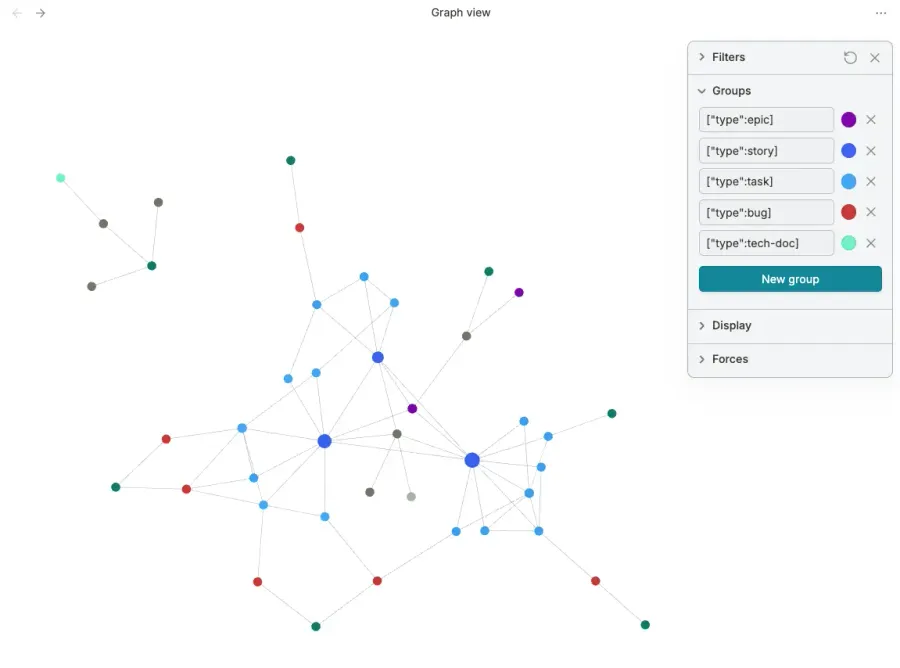
A story lists its tasks as wikilinks. A bug links back to the task that introduced it. A release links to its retrospective. A retro links to the stories it reviewed. Every path is two hops or fewer:
epic -> story -> task -> bug -> release -> retro -> action item -> _index.mdThe agent doesn’t need to load the whole vault. It loads the story, follows one link, lands in the right task or bug, and stops. Tokens spent: minimal. Context fidelity: high. This is the difference between “search the codebase for X” (expensive, noisy) and “read this one file and follow the link” (cheap, surgical).
5. The Brainstorming Checklist That Catches Spec Bugs
Unit tests catch logic bugs. They do not catch spec bugs — the wrong screen, the missing config knob, a value that violates a database constraint nobody documented. Most LLM-written code that ships broken is broken for spec reasons, not logic ones.
Before any story moves from brainstorming to todo, the wiki forces four questions:
- Step-by-step UI flow. What does the user see at each step? What page loads? What are the error and loading states? Don’t say “user verifies email” — specify which page, what URL, what shows on success and failure.
- Backend integration points. Which service handles each step? How are tokens or sessions passed between server and client? Who creates the session, who reads it?
- External config requirements. What dashboard settings, env vars, DNS records, or third-party config are needed? List them in an
## External Configsection. - Data entity values. Cross-check every column value mentioned in the story against the actual schema constraints — CHECK, enum, NOT NULL. If the spec says
role = 'parent', verify that string exists in the constraint.
Every one of these questions costs minutes to answer up front and saves hours of debugging later. They exist because they are the questions retros keep finding at the root of bugs.
6. Token and Time Tracking
Two fields on every task and every story:
used_tokens:
time_spent:
You fill them in when the work flips to done. Tasks record their own actuals. Stories sum their tasks. Over a few sprints you have real per-story cost data — token spend by feature area, by agent, by complexity tier.
You cannot optimize what you don’t measure. “The AI is expensive” is a feeling. “Auth stories cost 3× what CRUD stories cost” is a number you can act on.
used_tokens, completed, and status must be filled at done-time, not “later.” A wiki that drifts out of sync with reality rots into vibes — you and the agent both stop trusting it, and you’re back to re-deriving context from scratch.
7. The Release Lifecycle, Day by Day
The whole point of the wiki is that it accumulates. A single release page proves it:
- Epic drafted. A short page in
epics/names a goal and gets a key. - Story brainstormed. The four-item checklist runs. Status moves to
todo. - Tasks executed. Each task gets a
completeddate and a commit hash. Statusdone. - Bugs filed. When something breaks in QA or production, a bug links back via
related:to the task that introduced it. - Release cut. A
releases/v{x.y}.mdpage rolls up everything taggedrelease: v1.3via Dataview. No hand-maintained tables. - Retro written. After the release ships, a
retrospectives/retro-*.mdpage analyzes the bugs by root cause category and produces action items. - Action items feed back. The action items update
_index.mditself — new rules, new checklist items, new conventions. The wiki gets smarter every sprint.
Every step leaves a typed, linked artifact. Tomorrow’s session reads them and is up to speed in seconds.
8. The Afternoon Starter Kit
You don’t need the full structure on day one. Minimum viable wiki:
_index.md— your project overview, tech stack, URL scheme, data model. The one file every session reads first.epics/,stories/,tasks/— three folders, that’s it. Skip bugs, releases, retros until you have something to ship.- The four-item brainstorming checklist pasted into
_index.md. Use it on the first story. You’ll feel the difference.
Add the rest as you grow into them: bugs the first time something breaks, releases when you cut your first version, retros after the first release ships. Dataview can wait until release two — by then the value is obvious.
What You Have Now
| You used to | You now |
|---|---|
| Re-paste the stack each session | The agent reads _index.md once |
| Lose decisions when you switch models | The wiki survives the model swap |
| Discover spec gaps in QA | The brainstorming checklist surfaces them pre-code |
| Guess what the agent costs | used_tokens per story, summed from tasks |
| Repeat sprint mistakes | Retro action items land back in _index.md |
Next Steps
- Create the eight folders. Write
_index.mdwith your stack, URL scheme, and data model. One paste, ten minutes. - Adopt the four-item brainstorming checklist. Apply it to the next story you start. Ship it. Notice what would have slipped through.
- After your first bug, write a retro. After your second sprint, you will have a wiki that pays for itself every session.
Markdown plus frontmatter is not glamorous. That’s the point — boring formats outlive vendors. Build memory you own.